πŸ“– Member guide

How to use Sensi-bility Farm OS

Photo login Β· Me profile Β· role playbooks Β· ask support by text, voice or video Β· chat commands that drive the co-op.

πŸ“· How to save your profile photo

  1. Open Me (web app) or the Android app β†’ Me.
  2. Under 1 Β· Add your photo, take a clear face selfie (good light, face centred, no sunglasses).
  3. Tap Save selfie (step 1). Wait for β€œSelfie 1 saved…”.
  4. Take a second selfie and tap Save again to confirm. The checklist should show Photo confirmed.

How photo verification works

BusinesSite uses a two-step face enroll:

  • Step 1 β€” first selfie is stored as a pending reference (not fully confirmed yet).
  • Step 2 β€” second selfie is compared to the first. If they match, the face is confirmed.
  • Later unlocks (QR / photo login) compare a live selfie to the confirmed photo only.
  • If a live photo does not match, support can open an Access request, compare photos, and grant access.
  • You can also tap Ask support to authenticate me on Me for voice/text help.

Tips: same lighting for both enroll selfies; hold the phone steady; keep the whole face in frame.

πŸš€ After you join β€” start here (every role)

  1. Join at /sensi/register (role β†’ you + password + SMS OTP β†’ business/CIPC when needed). Household buyers skip CIPC; commercial farmers and ops roles answer registration status.
  2. Web login at /sensi/m: phone + password (photo login / ask support also available).
  3. Role tools: farm capture (My farms, fields, harvest, lots write) is farmer-only. The farmer names the farm. Processors/compliance can read lots; CareerWIL gets admin-assist + CIPC queue. Royal Houses, traditional health practitioners, RasTafari, medical doctors, herbal dispensaries, and researchers join the IKS Cannabis Sandbox from eCannabis.
  4. My farms (web + app) replaces a global Manage fields shortcut β€” fields live inside each farm onboard.
  5. You land in the app shell: Home Β· Feed Β· Chat Β· Market Β· Me (/sensi/m).
  6. On Me: save photo (2 steps) β†’ read Your details β†’ Edit details when a field must change β†’ download Android APK / QR when ready.
  7. Use Chat for commands, or open BusinesSite chat for live support.

🌿 IKS Farm Zone and πŸ“ Farm Location

Both sit on Location, step 2 of farm onboard. They answer different questions.

🌿 IKS Farm Zone

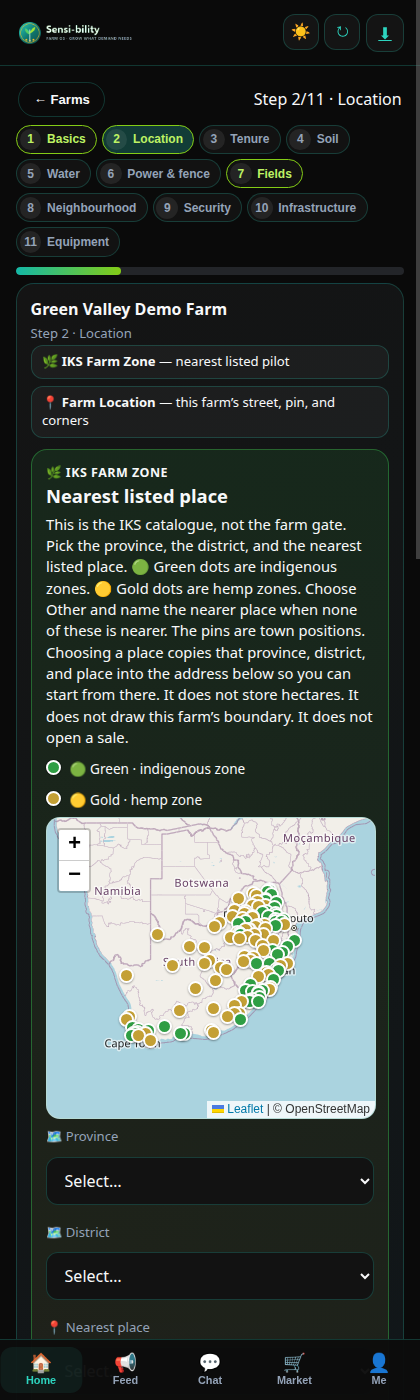
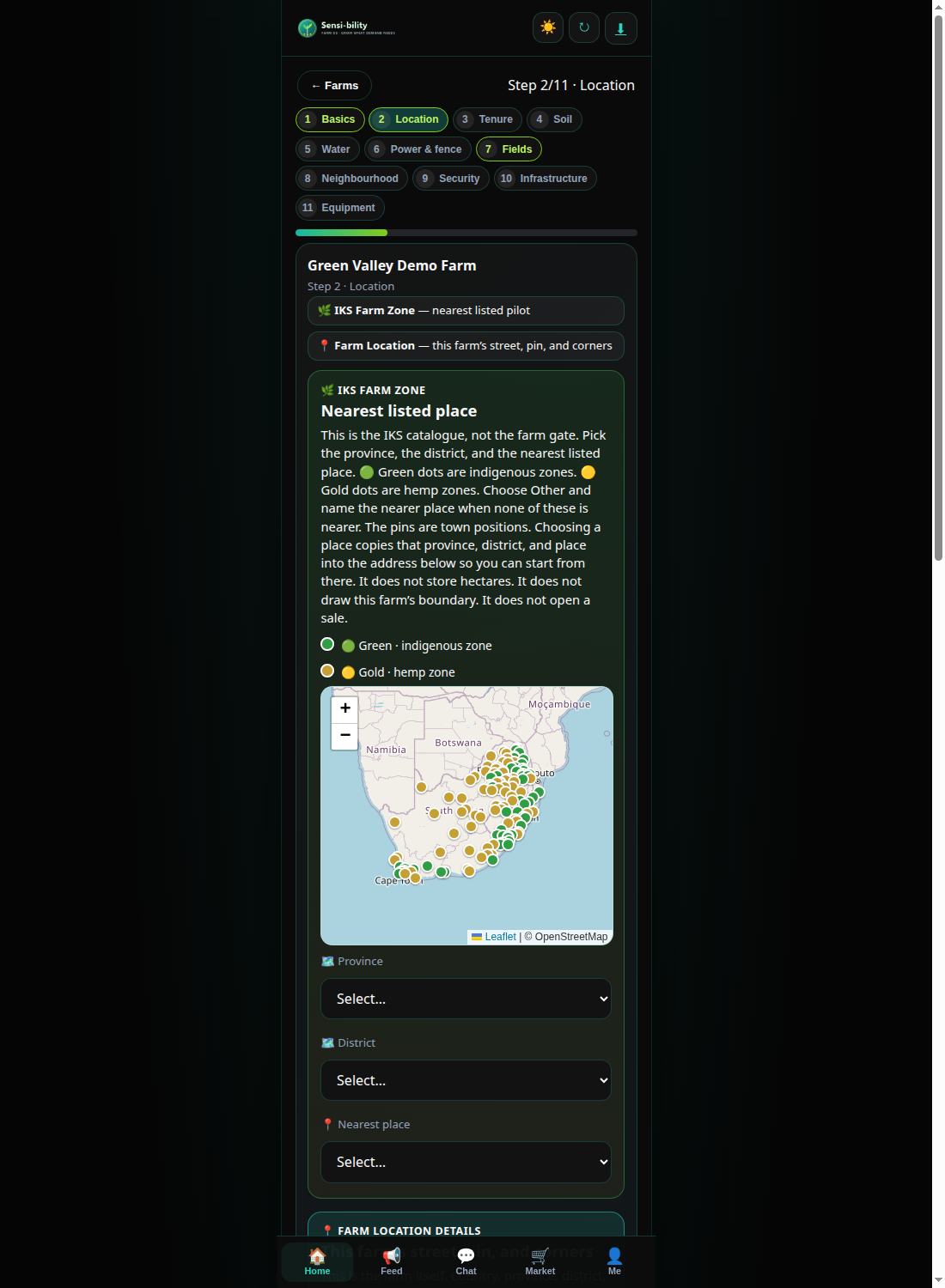
The October IKS list holds 131 nearest listed places. Pick the province, the district, and the place, or Other and name the nearer place. 🟒 Green dots are indigenous zones. 🟑 Gold dots are hemp zones. Mopani stays green. Qwaqwa is no longer listed. Engcobo is in Chris Hani, Nongoma in Zululand, Umngeni in uMgungundlovu, Nkomazi in Nkangala, Polokwane in Capricorn, and Ocean View in Garden Route. Mkhondo and Chief Albert Luthuli are green. Free State also lists Mohokare in Thabo Mofutsanyana (gold), Mohokare in Xhariep (green, pinned at Zastron), Letseme in Xhariep (gold, pinned at Koffiefontein), and Moqhaka in Fezile Dabi (gold, pinned at Kroonstad). The pins are town positions. Choosing a place copies that province, district, and place into the address so you can start from there.

It does not store hectares. It does not draw this farm’s boundary. It does not open a sale.

πŸ“ Farm Location details

This farm. Country, province, district, municipality, town, and the street or farm road. Find this address on the map zooms the pin. Use my GPS location drops the pin where you stand. Tap the map to draw the corners of the active zone.

These points belong to this farm. They stay separate from the IKS place above.

Step 2 with the IKS Farm Zone panel above Farm Location
πŸ“± Step 2 on a phone. The green panel is the IKS Farm Zone. Farm Location continues under it.
Location step with the gold and green IKS map
πŸ—ΊοΈ The gold and green pins are town positions on the October IKS list of 131 places. They are not the farm’s corners.

🎭 Guides by role β€” registration, then the tools

Every role starts the same way, then opens only the tools that belong to that seat. A hemp or nsango sale stays closed.

πŸ“ Registration β€” every role

  1. Open /sensi/register and choose the role card. The card name is the seat you will use.
  2. Enter your name, phone, and password. Tick the POPIA consent so the account can be created. Confirm the phone with the SMS code.
  3. Household buyers skip the company questions. A commercial farmer, and the operations roles that ask, answer whether the business is registered. CareerWIL can help with CIPC from the assist queue. That queue does not create a farm from your name.
  4. Sign in at /sensi/m. Phone + password. Or unlock with photo / ask support.
  5. On Me, open the Role guide. It lists every button on this profile. Save two selfies. The second selfie confirms the first. Then fill identity and residence.
  6. Home shows the tools for the role you joined with. Market, Orders, and Demand are on every profile because every member can also buy co-op produce. The public market lines are cabbage, maize, and tomato.

🌾 Farmer / Producer

Start: Me β†’ Identity β†’ Home Β· Farm onboard (one or more farms) β†’ Fields β†’ Seed lots β†’ Plantings β†’ Harvest β†’ Lots & QR β†’ Market.

  1. Open Farm onboard from Home β€” name each farm yourself (a farm is not created from your name). On Location, two panels stay separate. 🌿 IKS Farm Zone is the nearest listed place on the October IKS list: 131 places, by province, district, and place, or Other. Green is indigenous. Gold is hemp. Mopani stays green. Qwaqwa is no longer listed. Engcobo is in Chris Hani, Nongoma in Zululand, Umngeni in uMgungundlovu, Nkomazi in Nkangala, Polokwane in Capricorn, and Ocean View in Garden Route. Mkhondo and Chief Albert Luthuli are green. Free State also lists Mohokare in Thabo Mofutsanyana (gold), Mohokare in Xhariep (green, pinned at Zastron), Letseme in Xhariep (gold, pinned at Koffiefontein), and Moqhaka in Fezile Dabi (gold, pinned at Kroonstad). That choice does not store hectares and does not draw the boundary. πŸ“ Farm Location is this farm: street, town, GPS pin, and the zone corners. Use Find this address on the map, or your GPS, then tap the map.
  2. On eCannabis, the IKS project for a farm is the IKS Farm Zone saved on Location. The card lists that project, the track, the six process phases, and any daily, weekly, or monthly progress reports. It does not list sample district projects to join. An admin adds, edits, or deletes tracks on the eCannabis card, and on the same list in BusinesSite: Sensi-bility β†’ 🌿 eCannabis projects β†’ project code IKS β†’ πŸ—ΊοΈ IKS tracks. Open a row to edit it, then save the project. The dialog only stages that row. Leave every district unticked, or leave the district list empty on the form, to put the whole province on the track. Tick or select districts when only those districts belong on it. No province is on a track until an admin saves one. A research and commercial track keeps Scania on record for BioDiesel from eCannabis nsango farmers. That record does not open a sale. A research track, and any place that is not on a named track, stays research only.
  3. Attach tenure (title example e.g. Title deed 2019), a soil test (title example e.g. Soil Test 2019), and water documents (title example e.g. Water test 2022). The sample title follows the document type you pick.
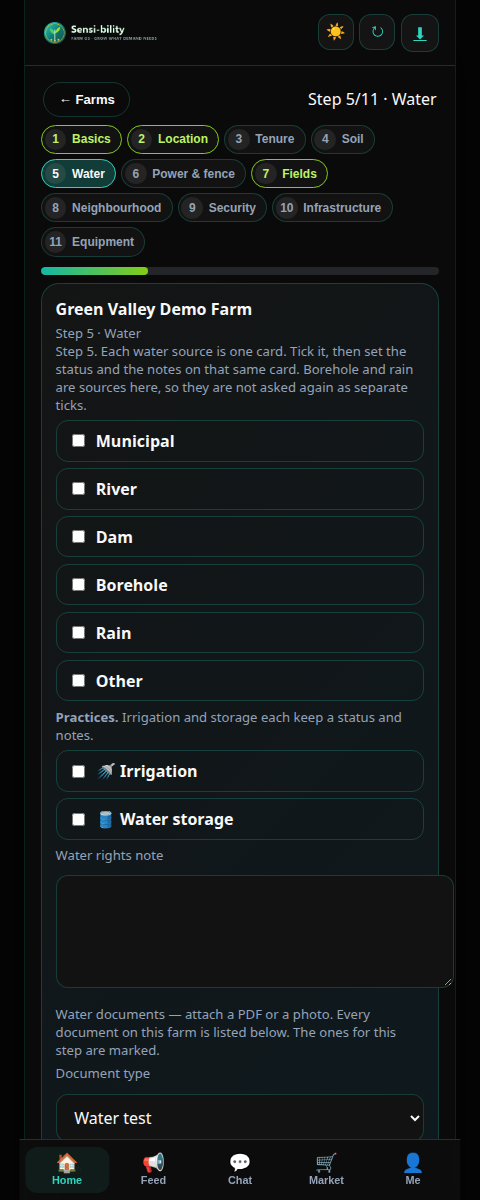
  4. On Water (step 5), each source is one card: the type, the status, and the notes sit together. Irrigation and water storage are practice cards on that same step. On Power & fence (step 6), each electricity source lines up the same way. Tick perimeter fencing and its status and notes open on that card.
  5. Water step with a card for each source
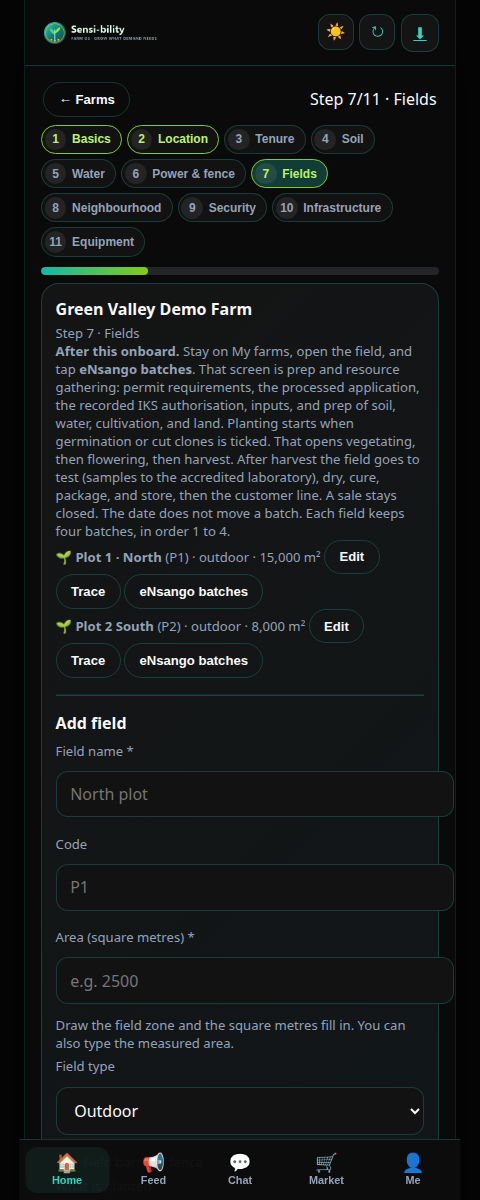
  6. Add fields in square metres. The Fields step is grouped so each part is easy to read: πŸ“ the field, πŸͺ΅ the barrier, 🌾 what is planted, πŸ“ the map, 🌰 the seed, βš™οΈ processing after harvest, and 🀝 the offtaker. Draw each field’s GPS zone the same way as the farm map. Tick Field barrier / fence and record its status and notes on that card. What is planted is chosen from a category, then a subcategory when that category has one, then the crop: Industrial crops, then Cannabis, then Hemp or Nsangu; or Vegetables, then the vegetable. Seed source lists the seeds for that crop. Hemp uses the cultivars in the hemp planting guide. Nsangu uses the IKS landrace list by province. Other crops use that crop’s own seed, or Other, because those documents do not name a variety list. Save & continue on a filled field form saves that field and stays on the step. Tap eNsango batches on the saved field to open the next phases. On Neighbourhood (step 8) and Security (step 9), tick what applies and write a note for each option you select. A typed note is kept with that place. On Infrastructure, each building is its own card with a status and notes. On Tenure, Soil, and Water, only the documents for that step are listed. On Equipment, an item still typed in the form is saved when you tap Save. Save again with an empty equipment name when you are ready to finish.
  7. On the field, record the chain: seed source β†’ cultivating β†’ harvest β†’ processing (dry, cure, clean, bale, store, pack) β†’ offtaker. Processing stage and status are the post-harvest record on the field. They do not move an eNsango batch. An offtaker record does not open a sale. Hemp and nsango stay closed until an authorisation is on the file.
  8. When you tap Save & finish, onboarding is complete. The next screen is πŸ“œ Regulatory compliance. It is not one of the 11 onboard steps. The progress line shows onboarding, regulatory compliance, prep, planting, after harvest, and the market. Each phase says waiting, not started, in progress, or done. A sale stays closed on every phase.
  9. Say whether a permit is already issued. Yes: load the number, the issuer, the dates, and the permit document. This screen records a permit that was already issued. It does not issue one. A current IKS research authorisation opens prep. A hemp permit stays on the file and does not by itself open eNsango prep. No: to continue you apply. If you want help, the screen lists the requirements. Nsango has 12 steps, starting with the application form, the fence, the site manager, and the extension officer, through the R600 fee record, the site visit, the ARC mentor, the local university or technical college, and the provincial champion. The fee is recorded as paid. This screen does not take the fee. Hemp follows HP-Form-001, Application for a Hemp Permit, under the Plant Improvement Act 1976: the signed application, the activities, the applicant, the entity or a note that you apply as an individual, the site, the land right, the premises map, the cultivation record, the harvest table, the source of propagating material, the security proposal, the Part E answer, the signed declaration, proof of payment, a research proposal when the purpose includes research, and copies of the required documents. The land right and the premises map can use what onboarding already captured. The form says proof of payment must accompany the application. Upload that proof. This screen does not take the payment, it does not submit the pack to the Registrar, and it does not issue the permit. CareerWIL can help by voice. When the pack is complete it is kept on the file. The permit is loaded only after it has been issued.
  10. Prep starts on the field after that current IKS authorisation is on the file. Open the field and tap eNsango batches. That is gathering inputs, then the soil test, the water test, the cultivation choice, and land preparation. Planting starts when germination or cut clones is ticked. That opens vegetating, then flowering, then harvest. After harvest: test (samples to the accredited laboratory), dry, cure, package, store, then the customer line. A sale stays closed. The date does not move a batch. Each field keeps four batches, in order 1 to 4.
  11. Fields step with eNsango batches on each plot
  12. Share Lots & QR / origin link; list on Market; settle via eyesWallet / PayFast.
  13. Hemp / nsango growers: pick those commodities; use Compliance partners for labs & permits.

Chat: log crop tomato 50kg @ R15 Β· list produce Β· my orders Β· find compliance

πŸ“œ Regulatory compliance β€” after onboarding

Start: Finish the 11 onboard steps and tap Save & finish. Open Regulatory compliance on the farm. The progress line is on My farms.

  1. Say whether a permit is already issued.
  2. If yes, load the number, the issuer, the dates, and the permit document. Choose an IKS research authorisation or a hemp permit. The screen records a permit that was already issued. It does not issue one. Dates that miss today keep prep closed.
  3. If no, you need to apply before prep. If you want help, the nsango list has 12 requirements. The hemp list is the HP-Form-001 checklist: signed application, activities, applicant, entity or individual, site, land right, premises map, cultivation record, harvest table, propagating material, security proposal, Part E, declaration, proof of payment, research proposal when research is included, and copies. Fence, the land right, and the premises map can use what onboarding already captured. Record the nsango R600 fee as paid. For hemp, upload the proof of payment the form asks for. This screen does not take a payment, it does not submit the pack to the Registrar, and it does not issue the permit.
  4. Ask CareerWIL to help by voice. CareerWIL can leave a voice reply. CareerWIL does not load the permit.
  5. Submit the pack when every requirement is captured. When the permit is later issued, come back and load it. Prep on the field opens when a current IKS research authorisation covers today. A hemp permit stays on the file. A sale stays closed.

πŸ›’ Buyer / Consumer

Start: Register as Buyer. On Me, say whether you are a household, restaurant, hotel, retailer, school, business, distributor, or processor buyer. Then Market.

  1. Browse Market. Co-op produce you can order today is cabbage, maize, and tomato. Open stays inside Farm OS.
  2. Orders: pick a co-op listing, enter quantity, delivery address, and the date, then place the order. Demand posts what you need by a date.
  3. Check lot origin / QR when the seller shares it. Pay with eyesWallet or PayFast and follow a logistics quote when one is offered.
  4. eCannabis produce is visible from age 18. The customer journey for hemp or nsango starts after store. A sale stays closed. Amehlo stays closed.

Chat: show market Β· post demand 5 tons cabbage by 2026-12-01 Β· my orders Β· my wallet

🏭 Agro-processor

Start: Register as Agro-processor. Complete Me. You read lots. You do not capture a farm unless you also hold the farmer role.

  1. Source bulk via Market or post Demand. Ask the farmer for the lot code or QR. Find lots stays a read of the chain the farmer recorded.
  2. Use Compliance partners for food-safety and HACCP. Processing equipment on a farm record does not publish a recipe.
  3. Hemp and nsango stay closed until an authorisation is on the file, and a sale stays closed.

Chat: show market maize Β· find farmer Β· find compliance

πŸ“¦ Input supplier

Start: Register as Input supplier. Complete Me, then list seed, feed, or equipment the farmer can record as a lot number.

  1. Publish input listings with a clear lot or batch number. The farmer copies that number onto the field.
  2. For hemp or nsango genetics, the farmer still records the authorisation on the file. A listing here does not open a sale.

Chat: list produce Β· show market Β· find farmer

🚚 Logistics

Start: Register as Logistics. Complete the capacity profile, then quote on orders.

  1. Open Logistics and keep coverage and cold-chain current.
  2. Respond to quote requests from Orders. Delivery follows the quote. You do not open a hemp or nsango sale.

Chat: find logistics Β· my orders

πŸ“š Government Officer

Start: Register as Government Officer. Choose one seat: extension officer, regulatory inspection, law enforcement, research agent (university, ARC, CSIR), policy, set-aside markets, economic development and national priorities, development finance, or the steering committee.

  1. The seat is stored on your profile. Home opens the government tools for that seat.
  2. You can read the quality system and the farm records your seat is allowed to see. You do not write the farmer’s batches.
  3. Appear in Find professionals. Chat: find extension. Bulletins open Feed for weather and advisory.
  4. Point a farmer to My farms β†’ Regulatory compliance, and after a current permit is on the file, to the field β†’ eNsango batches. A government seat does not issue a permit from this screen and it does not open a sale.

βœ… Compliance

Start: Register as Compliance. Say whether you are internal to one farm or external. An internal officer selects the farm. An external officer checks that the internal officer exists and is authentic.

  1. Set the service card: GAP, HACCP, THC lab, hemp licence, nsango licence, and the chain stages you cover. Farmers find you with find compliance.
  2. The internal officer writes the quality system on the farm: strategy, testing and inspecting, CAPA, records, and only the standards that apply. For each standard, say you need help to apply, or upload the document you already hold.
  3. External compliance reads that record and confirms the internal officer. You can read lots. You do not move an eNsango batch. A sale stays closed.

πŸ§ͺ Accredited laboratory

Start: Register as Accredited laboratory. The farmer records your name and the sample code before you capture results.

  1. Collect the harvest sample, deliver it, and record the result: visual test, aromatic terpenes, heavy metals, microbes, cannabinoids, and the certificate of analysis.
  2. Record the accreditation reference before the harvest tests. The result text is the record. This screen does not set a pass or a fail band.
  3. Daily maintenance on the farm stays with the farmer: EC, pH, humidity, temperature, visual, aroma, pests, diseases, and weeds. Temperature guidance on the batch stays 23–30 Β°C and humidity 50–65%. EC has no invented optimal band. CO and water pH stay recorded without a pass band.
  4. A laboratory result does not open a sale.

πŸ‘· CareerWIL / admin assist

Start: Register as CareerWIL. Use Home assist tools and the CareerWIL shell.

  1. Help with CIPC from the assist queue. Collect a voice, video, or text report when a field asks. CareerWIL can enhance a daily, weekly, or monthly maintenance report.
  2. On Regulatory compliance, reply by voice only after the farmer has asked. You do not mark the requirements and you do not load the permit.
  3. You do not capture farm fields unless you also hold the farmer role. Support bridge opens Chat.

🌿 eCannabis seats β€” shared path

Royal Houses, traditional health practitioners, RasTafari, medical doctors, herbal dispensaries, and researchers register with that role, then open Home β†’ eCannabis and join the IKS project. The seat follows the role. Joining records membership. It does not open a hemp or nsango sale, issue a medical card, or grant a permit. Farmers can join the same project, and they name a farm only when they are ready.

πŸ‘‘ Royal Houses

  1. Register with the Royal Houses card. Save the two selfies on Me.
  2. Open eCannabis and join the IKS Cannabis Sandbox. The home photo is the Royal Houses seat.
  3. Read the project and the seat notes that your role is allowed to see. This seat does not grant land, a permit, or a sale.

🌿 Traditional Health Practitioners

  1. Register with the Traditional Health Practitioners card. Say whether you are RPL certified. If you are, attach the certificate before the account is created.
  2. Say whether you are affiliated to a Traditional Health Practitioners association. Select one or more, or Other and name that association.
  3. Contact your Healer representative in the Cannabis Steering Committee. If you are RPL accredited - register to be part of the commercial pilot - please note you must attach your certificate. Open eCannabis and join the IKS project.

🦁 RasTafari

  1. Register with the RasTafari card. Open eCannabis and join the IKS project.
  2. Sacrament and adult-use cards stay closed. A sale stays closed.

🩺 Medical doctor

  1. Register with the medical doctor card. Open eCannabis and join the IKS project.
  2. A medical card is not issued here. A sale stays closed.

πŸ’Š Herbal dispensary

  1. Register with the Herbal dispensary card. Open eCannabis and join the IKS project.
  2. A medical card is not issued here. A sale stays closed.

πŸ”¬ Zero Waste Innovative Researcher

  1. Register with the researcher card. Open eCannabis and join the IKS project.
  2. A pilot stays a request. This seat does not grant an authorisation.

πŸŽ›οΈ Buttons on the Farm OS home

Every member can also buy, so Market, Orders, and Demand are on every profile. Open the same list inside the app at Button guide. Short films play at Reels.

ButtonWho sees itWhat it does
Home Β· Feed Β· Chat Β· Market Β· MeEveryoneThe bottom bar. Home is shortcuts. Feed is the co-op board. Chat is mic, message, and send. Market holds co-op produce and eCannabis. Me is photo, identity, and sign out.
FeedEveryoneRead posts. Write a status, like, or comment.
Chat / voiceEveryoneTap the mic to speak into the message, type if you prefer, then send. Replies keep bold, commands, and emoji. Try sensi help.
MarketEveryoneCo-op produce scrolls to Cabbage, Maize, and Tomato. Open stays in Farm OS so you can place an order. eCannabis opens that sector. A hemp or nsango sale stays closed.
OrdersEveryonePick a co-op listing, enter quantity, delivery address, and the date, then place the order. Your orders sit under that list.
DemandEveryonePost what you need, and read open co-op demand.
eCannabisEveryone, when the profile can see itDeclare hemp or nsango crops when you are a farmer. The IKS project on a farm is the IKS Farm Zone on the October list of 131 places. The card shows the track, the process, and progress reports. An admin adds tracks on this card and under Sensi-bility β†’ 🌿 eCannabis projects β†’ project code IKS. Produce is shown from age 18. Amehlo stays closed. A medical card is not issued here.
Regulatory complianceFarmer, after onboarding. CareerWIL can reply by voice. Government, compliance, and the laboratory can read the record their seat allows.The step after the 11 onboard steps. Say whether a permit is already issued and load it, or ask for help to apply and capture each requirement from the preparation guide. CareerWIL can collect that application by voice. This screen does not issue the permit. A sale stays closed.
ProgressFarmer on My farms, and on Regulatory complianceOnboarding, regulatory compliance, prep, planting, after harvest, and the market. Each phase shows waiting, not started, in progress, or done. The market line opens after store. A sale stays closed.
eNsango batchesEveryone on eCannabis, capture on the farmer fieldOpens after a current IKS research authorisation is on the farm. Shows batch 1 to batch 4 and the days expected until the next stage. The farmer records inputs, preparation, then germination or clones, vegetating, flowering, harvest, testing, drying, curing, packaging, and store. The permit itself is recorded under Regulatory compliance, not on this field. The customer line starts after store. A sale stays closed. Daily maintenance adds a photo for EC, pH, humidity, temperature, visual, and aroma, plus pests, diseases, and weeds. Reports are daily, weekly, or monthly, as voice, video, or text.
Quality systemInternal compliance officer writes it. The farmer, an external compliance officer, and a government officer read what their seat allows.Internal quality covers testing and inspecting, CAPA, and records. External standards are selected only where they apply: need help to apply, or upload the document you have. POPIA consent is a tick on registration.
Royal Houses Β· Traditional Health Practitioners Β· RasTafari Β· Medical doctor Β· Herbal dispensary Β· ResearcherThat seatOpens eCannabis so you can join the IKS Cannabis Sandbox as that seat. Royal Houses does not grant land, a permit, or a sale. RasTafari keeps sacrament and adult-use cards closed. Traditional Health Practitioners say whether they are RPL certified and attach the certificate when they are, and select their association or name another.
My farms Β· Record farming Β· Harvest & lotsFarmerRegister one or more farms, then fields, harvest, and lots. These stay on Farm onboard.
Find lotsProcessor, ComplianceAsk the farmer for the lot or QR. The farmer records it on farm onboard. Chat can carry the question.
LogisticsLogisticsCapacity, cold-chain, and quotes on orders. The explanation stays in Farm OS.
BulletinsExtensionOpens Feed for weather and advisory.
Compliance hubCompliancePermits, audits, and the hemp and nsango chain. The explanation stays in Farm OS.
CareerWIL assistCareerWILOpens the CareerWIL shell for CIPC help and member admin.
Support bridgeCareerWILOpens Chat.
Find professionalsAnyone who is not only a farmer, and extensionOpens Chat. Try find extension, find farmer, or find compliance.
ReelsEveryoneA still of each live screen, with a spoken narration: register, sign in, IKS Farm Zone, Farm Location, water, power, fields and eNsango batches, neighbourhood, security, equipment, My farms, the role home, and regulatory compliance. Play them on this guide or in the app.
Button guideEveryoneThis list, filtered to the buttons on your profile.

🎬 Reel β€” one film for each step

Each film is a still of that live screen, with a spoken narration, so you can hear the step and see where it sits before you do it on your own profile. A sale stays closed in every film.

πŸ“ Register

πŸ” Sign in

🌿 IKS Farm Zone

πŸ“ Farm Location

πŸ’§ Water

⚑ Power and fence

🌱 Fields and eNsango

🏘️ Neighbourhood

πŸ”’ Security

🚜 Equipment

🏑 My farms

✨ Role home

πŸ“œ Regulatory compliance

PDF of the earlier pack: Sensi-bility Role Guide (23 October 2026). This page is the current guide. It includes regulatory compliance and the narrated films.

πŸ†˜ Ask for support β€” text Β· voice Β· video

πŸ’¬ Text chat

In the app shell open Chat, or BusinesSite chat:

Open BusinesSite chat

Type what you need in plain language, or use commands below. Say your phone number if you are not signed in.

πŸŽ™οΈ Voice

Web chat: tap the mic to start, tap again to stop and send (not hold-to-record).

Android app: hold to record, release to send.

Support can listen, transcribe, and reply. On Me, use Ask support to authenticate me for unlock help.

πŸ“Ή Video / live assist

Ask in chat: call support or β€œplease video call me”. Agents can join a voice/video Assist session, speak in your language, and guide you through screens (navigate / highlight) while you watch.

You will be asked for recording / screen-consent before an agent drives the view.

On Me β†’ Ask support to authenticate me notifies the desk with your name, phone, role and photo request.

πŸ€– How chat can assist with everything

Chat is the co-op β€œremote control”. Type sensi help anytime. Useful starters:

You typeWhat happens
sensi helpFull command list + guide link
open sensiPortal links
show market / show market hempLive listings
post demand …Create buyer demand
log crop …Farmer crop batch + draft listing
my orders / my walletYour trade & balance
weather / outbreaksBulletins
find compliance / find extensionProfessionals directory
unlock requestSupport device unlock flow
sync nowRefresh offline queue / live data

You can also write naturally: β€œI need help listing tomatoes”, β€œauthenticate my photo”, β€œfind a THC lab for hemp” β€” support or the assistant will route you.

Quick links

πŸ’¬ Chat / voice